
Icedrive for a Family Archive: Fit, Copies and a First Restore
Weigh Icedrive’s unresolved integrity evidence, compare storage and backup alternatives, and check a separate export while preserving independent originals.
Our verdict: Icedrive is not our default new purchase for an irreplaceable family archive while current remediation of published integrity weaknesses remains unverified. Treat it, if used, as an additional copy with independently controlled originals and an exit plan. The concern applies to ordinary photographs as well as private material: preserving a file means keeping its contents and identity reliable, not only keeping it confidential.
Hofmann and Truong’s 2024 primary research found file-integrity, location/name manipulation, reordering, and file-injection weaknesses for Icedrive under a malicious-server model. These findings do not establish plaintext recovery for Icedrive or an observed ordinary-account breach. This review has not verified a current fix or run a cryptographic test; an ordinary successful download cannot establish resistance to that threat model.
If you already use Icedrive, the method below helps you retain and check a small ordinary-file export. If you are choosing a service, compare the task-matched alternatives before paying. This assessment uses current public documentation and the primary research, without an account, upload, speed, interface, or recovery test by this publication.
Difficulty: Comfortable beginner using ordinary files and folders
Planning time: Allow 30–60 minutes for preparation and checking, plus transfers; this is a planning estimate
Before starting: Authorized source files, a computer, enough local space, and an independent local copy
A useful stopping point: One small folder downloaded and checked outside the source folder and mounted drive
Affiliate disclosure: Legacy Memory Book may earn a commission if you buy through links on this page, at no extra cost to you. Recommendations are based on the stated criteria, reader fit, limitations, and preservation or privacy needs—not commission rate.
When Icedrive fits—and when to use another route
Icedrive’s practical attraction is access to ordinary files through a mounted-drive interface and other official apps. That may be useful to an existing customer who can maintain independent copies, recovery instructions, and a checked export. It does not resolve the integrity concern above or turn storage into unattended whole-computer backup.
Keep another route if the archive is irreplaceable, you cannot maintain separate copies, encrypted family sharing is required, or nobody can take over the account and export work. Do not buy storage simply because organizing the photographs feels difficult; first protect the files you already have.
| Your immediate job | Route to compare | Work that still remains |
|---|---|---|
| Recover an archive computer after failure | A dedicated computer-backup service; Backblaze documents app and web restore routes | Select the right folders, confirm history, and check a real restore |
| Back up phone photos and share a curated encrypted collection | Proton Drive documents mobile backup, albums, and sharing | Check account recovery, recipient access, ordinary exports, and an independent copy |
| Add another location without another subscription | Keep an adequate existing provider or rotate a separate drive to a safe off-site location | Update, disconnect, label, and periodically open the independent copy |
These are task matches, not measured security or usability rankings. The family-photo backup comparison covers their wider tradeoffs. Storage, synchronization, viewing, and recovery are separate decisions.
What the current features and plan choice mean
The public plan page lists a free 10GB allowance without crypto or file history. Paid cards have their own capacity, history, transfer, and desktop-sync allowances; check the selected card rather than treating all paid plans as equivalent. A free account can demonstrate ordinary-file handling for your small set, but not features it excludes.
Ordinary protected links and collaboration are different from sharing encrypted-area files. Current official encrypted-sharing help says the latter is unsupported. The desktop mount uses caching; the convenience of seeing a file does not establish that it is stored fully offline. Those distinctions matter more to a family archive than the headline storage capacity.
Before considering payment, measure the files you need to retain, including video, book sources, and versions. Compare the renewal commitment and actual device/sync allowance with your routine. Record who will pay, check exports, and maintain the account when the original keeper cannot. An upfront or “lifetime” offer does not remove future maintenance or establish permanent custody.
If you still choose Icedrive for an additional copy after weighing these limits, compare current Icedrive plans against that written requirement. Do not proceed on an assumed promotional price, refund, or retention period; the terms conflict discussed below remains unresolved. Keeping an adequate existing route is a valid outcome of this review.
Step 1: Name the copies before uploading
Write down these four things separately:
| Item | What it means | What to check |
|---|---|---|
| Source folder | Your defined, usable archive files | You know exactly what is included |
| Independent local copy | Files on a separate local destination | They open without the source or cloud mount |
| Uploaded copy | Files stored in the cloud account | The transfer finished and the selection is complete |
| Mounted or cached view | A convenient way to access cloud files | It is not automatically a complete independent local copy |
The 3-2-1 backup method explains how these locations work together. Two folders on the same drive still share that drive’s failure risk. A mounted view can rely on the service and a partial cache, so count it only according to what you have actually retained independently.
Do not move, delete, or synchronize the only source as part of this exercise. Copy a small source set first, preserving its existing names and relationships.
Step 2: Prepare one permissioned folder and an inventory
Choose a manageable set that resembles the real project. Include a photograph with a back scan, a caption, a permission note, an audio file if relevant, and the current book PDF. Leave sensitive estate documents and authentication secrets outside the general archive.
Here is a designed example, not a tested collection: Mina-Book-01 contains six front/back scan pairs, three caption or permission files, one audio file, one transcript, two PDF editions, and one README. That totals 20 files. Your real total may differ, especially when motion components or metadata sidecars accompany photographs.
Create a simple inventory with one row per file:
Relative path | File size in bytes | Modified date | Source or purpose
photos/BOX01-001-front.tif | ... | ... | Front of loaned print
photos/BOX01-001-back.tif  | ... | ... | Back with inscription
Record the folder’s total file count and size. Optional SHA-256 checksums can strengthen a byte comparison, but do not replace opening files or protect a manifest that is itself altered. Our file-naming and metadata guide covers a readable index without requiring command-line tools.
Step 3: Choose ordinary or encrypted space deliberately
Do not assume every Icedrive file uses client-side encryption. Ordinary storage and the separate encrypted area have different capabilities and recovery requirements.
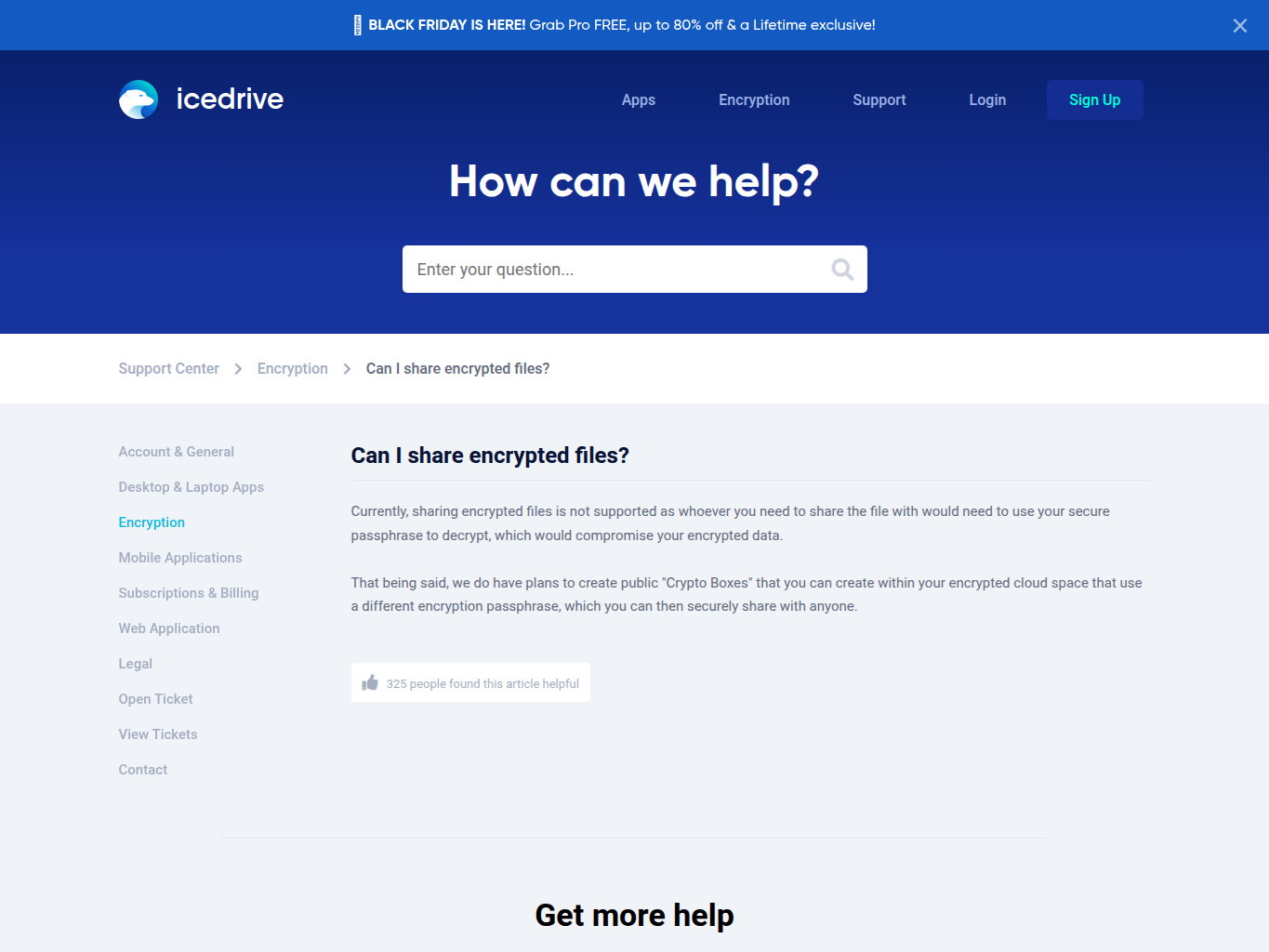
Icedrive’s encrypted-sharing help currently says encrypted files cannot be shared. Its proposed Crypto Boxes are future work, not a feature to build your family workflow around. If relatives need selected material, plan an approved sharing copy separately rather than giving them your encryption passphrase.
Key recovery matters before an upload. Icedrive says a forgotten encryption passphrase makes encrypted files unusable, and resetting the encryption key erases the encrypted section. Account-password recovery is a different process. Never reset a key to test recovery.
Keep the local archive usable independently, and arrange a secure location for lawful recovery instructions. If those responsibilities are not manageable now, stop with the local and other off-site copies you can maintain.
Step 4: Upload the small batch through a supported route
Use a currently supported official application or web uploader, checking its current help for your operating system. Record the application/version or browser and the date. Do not follow an old WebDAV tutorial: Icedrive’s current help says new-user WebDAV access was disabled on April 15, 2026, with existing access being retired.
Choose the copied trial folder and allow the transfer to finish. Inspect completion information and the destination contents. A visible folder name alone is insufficient: compare the uploaded selection with the inventory, including captions, sidecars, and nested folders.
Pause if any files are missing or transfers report errors. Retain both local copies and the transfer details. Do not expand to thousands of items while the small set remains uncertain.
Step 5: Download into a fresh folder and check it
Download the complete trial set to a new local folder, such as Mina-Book-01-restore-check. If the download is an archive such as a ZIP file, extract it into a fresh folder before comparing its contents. Choose a location outside the original source and mounted cloud drive. Do not overwrite the working archive or delete it to make this a test.
Compare the recovered folder with the inventory:
- Match the extracted files’ relative paths, file count, and byte sizes against the inventory; do not compare ZIP size with the original folder size.
- Open the front and back of the same photograph and read its source note.
- Open the caption and permission record and confirm their connection to the image.
- Play audio at the beginning, middle, and end, and locate its transcript.
- Open each PDF and inspect the first, middle, and final pages.
Record exceptions rather than explaining them away. If counts, sizes, or opening checks fail, stop expansion. Check current transfer status and official help, retry only a copied batch where appropriate, and keep using the independent copies already available. A successful small check is useful evidence about that batch, not a guarantee about future recovery.
Step 6: Prepare sharing, maintenance, and an exit
Make a separate sharing folder containing only approved derivatives. Keep restricted source notes out of it. Our private-sharing guide helps distinguish archive access from permission to redistribute a photograph or story.
Add a record of the account owner, plan, renewal responsibility, last checked export, and next review date to the handoff folder. Keep passwords and encryption secrets in the agreed secure system, with a locator in the general instructions rather than the secrets themselves.
Icedrive’s terms and plan marketing have conflicting refund wording; renewal and account-access conditions also matter. Do not build an archive around an assumed grace period or the word “lifetime.” Keep a checked export before cancellation or a major plan change, and ask the provider to resolve the current terms that matter to you.
Make a family handoff that works without your account knowledge
A second keeper should be able to identify the archive, understand the intended sharing boundaries and locate an independent copy. That is a different requirement from knowing your account password. Do not distribute the account or encryption passphrase merely to make a family album easier to open.
Write a plain-language handoff alongside your independent files:
| Handoff item | What the next keeper should find |
|---|---|
| Archive identity | A named folder, approximate contents and date of the last completed copy |
| Separate copy | Where it is kept and how an authorized keeper can open it without the cloud mount |
| Family sharing edition | A deliberately selected set of copies, with sensitive originals excluded |
| Context | A caption or inventory file that preserves names, uncertainty and contributor credit |
| Maintenance | Who checks the copies and what happens if the original keeper cannot continue |
Keep account-recovery instructions through an appropriate private arrangement, separate from a publicly shared folder. A file named “family instructions” can itself expose personal details if someone later shares its parent directory. The audience of the archive, the shared album and the recovery instructions need not be the same.
For a small check, ask an authorized second keeper to open an ordinary duplicate from the independent copy and find its description. Record what they could actually locate and anything that required your explanation. This proposed check is about your handoff’s usability; it does not test Icedrive’s cryptography or resolve the published integrity findings above.
If the keeper can open the photograph but cannot determine who it shows, preservation is still incomplete for the memory-book task. If they can find a cloud link but no independent file, recovery remains incomplete. Those two failures need different repairs: context for the first, another controlled copy for the second. Neither requires buying a larger plan before you understand the problem.
Frequently asked questions
Does seeing files in the mounted drive prove I have a backup?
It proves you can see that view. Check what is actually stored independently, then download and open a separate copy. A mount or partial cache is not enough evidence to count as another complete local archive.
Can I share an encrypted folder with the whole family?
Current official help says encrypted-file sharing is unavailable. Use a separately approved sharing derivative through a suitable method. Do not distribute the archive owner’s account credentials or encryption passphrase.
Must I buy a plan before protecting my files?
No. First identify the source and make an independent copy using available suitable storage. A product decision can wait. The next useful step is a completed, documented check of one small folder.